
A desktop pet can add a little character to the space around your work. System Cat 2 adds a practical detail: a small hardware-status board you can open directly from the cat.
System Cat 2 is an Aelrox desktop companion that connects its reactions to system status and provides a quick view of CPU, memory, power, and network information. This walkthrough focuses on the current public version and a real Windows session, rather than a simulated dashboard.
Meet the current cat
Install Aelrox, then open System Cat 2 in the Micro Apps Store. Install the micro app and choose Open.
The current character is an illustrated orange cat with a transparent window around its silhouette. A small CPU LOAD button appears underneath it. You can begin with that button; you do not need to configure a monitoring dashboard or create an AI app first.

System Cat 2 in the actual Windows client. A neutral background was placed behind the window for a clear screenshot.
The desktop pet introduction covers the broader installation workflow. This article concentrates on the feature that makes this particular companion useful: asking it for a short status check.
Open the live hardware board
Select CPU LOAD. The cat briefly displays a board containing four lines:
- CPU and MEM: current processor and memory usage percentages.
- BAT: the available battery or desktop-power status.
- NET: the reported network connectivity state.
- LIVE: the sample time shown with the reading.
In the captured Windows session, the board showed CPU 11%, MEM 46%, BAT DESKTOP, and NET ONLINE. Those are readings from that moment on the demonstration computer, not expected values for every Aelrox user.
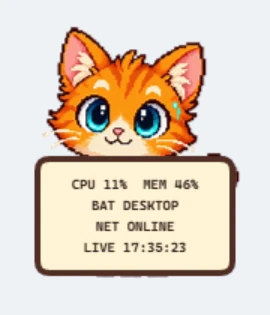
The board opened from the cat's button and displayed live host readings. It appears briefly before the regular character view returns.
You can select the button again when you want another glance. The board is meant for a quick check; it is not a permanently expanded graph.
Read the status in context
A percentage is a momentary observation. CPU usage can rise while a program is opening, a video is processing, or another task is running. Memory use also changes with the applications you have open.
The board helps answer a small question: “What does my computer's general status look like right now?” It does not identify which process caused a spike, show a history of resource usage, or diagnose failing hardware.
Likewise, NET ONLINE reports connectivity status. It does not prove that a particular website is reachable or that the connection is fast. On a desktop computer without a battery reading, a desktop-power label is more meaningful than a made-up battery percentage.
Let the character add context, not urgency
System Cat includes reactions associated with resource and system states. Its character view gives the status display a more playful presence than a conventional meter.
When you want to understand what is happening, open the board and read the values instead of treating an expression as a precise measurement. Our screenshots verify the ordinary character view and the hardware-board action. They do not claim a controlled CPU-load test or a comparison with a diagnostic utility.
The companion is useful when you like having an occasional status cue nearby. You do not need to keep watching it for the product to serve its purpose.
Understand the access it needs
Showing system readings requires the corresponding hardware and system-status access. Review the permission information when installing or opening the micro app. The micro-app safety guide explains how Aelrox handles permission requests and controls.
The information shown here is a compact system summary. This article does not imply access to the contents of your documents, messages, or browsing history, and it does not establish what other micro apps may request.
Try one useful interaction first
Open the cat, select CPU LOAD, and read the board once. That is enough to decide whether a small status companion belongs in your desktop toolkit.
Open System Cat 2, or download Aelrox to run it on your desktop. Start with the live board rather than a complicated setup.