
CSV Recipe in Aelrox saves one reusable set of column choices, names, text sorting, whitespace cleanup and duplicate removal. It is useful when the same export arrives repeatedly and you want to prepare a consistent CSV without rebuilding those choices every time.
This is a text-oriented CSV tool. It preserves values as text and does not infer numeric, currency or date types. It does not open Excel workbooks or run spreadsheet formulas.
Build a rule from a representative file
Install Aelrox, find CSV Recipe in the desktop Micro Apps Store and open it. Choose Open CSV and select a UTF-8 CSV with unique, non-empty column headers.
Under Columns, keep the fields you need and enter the desired Output name for each one. Under Rows, choose a Sort by column and the order, then decide whether to enable Trim whitespace and Remove duplicate rows. Choose Apply to inspect the result.
Our larger example uses the public Seaborn taxi dataset: 6,433 records across 14 columns. To exercise reuse of an existing recipe, we renamed its first three input headers to the names expected by that recipe. The underlying records remained the public dataset; the adapted headers are a demonstration, not its original schema.
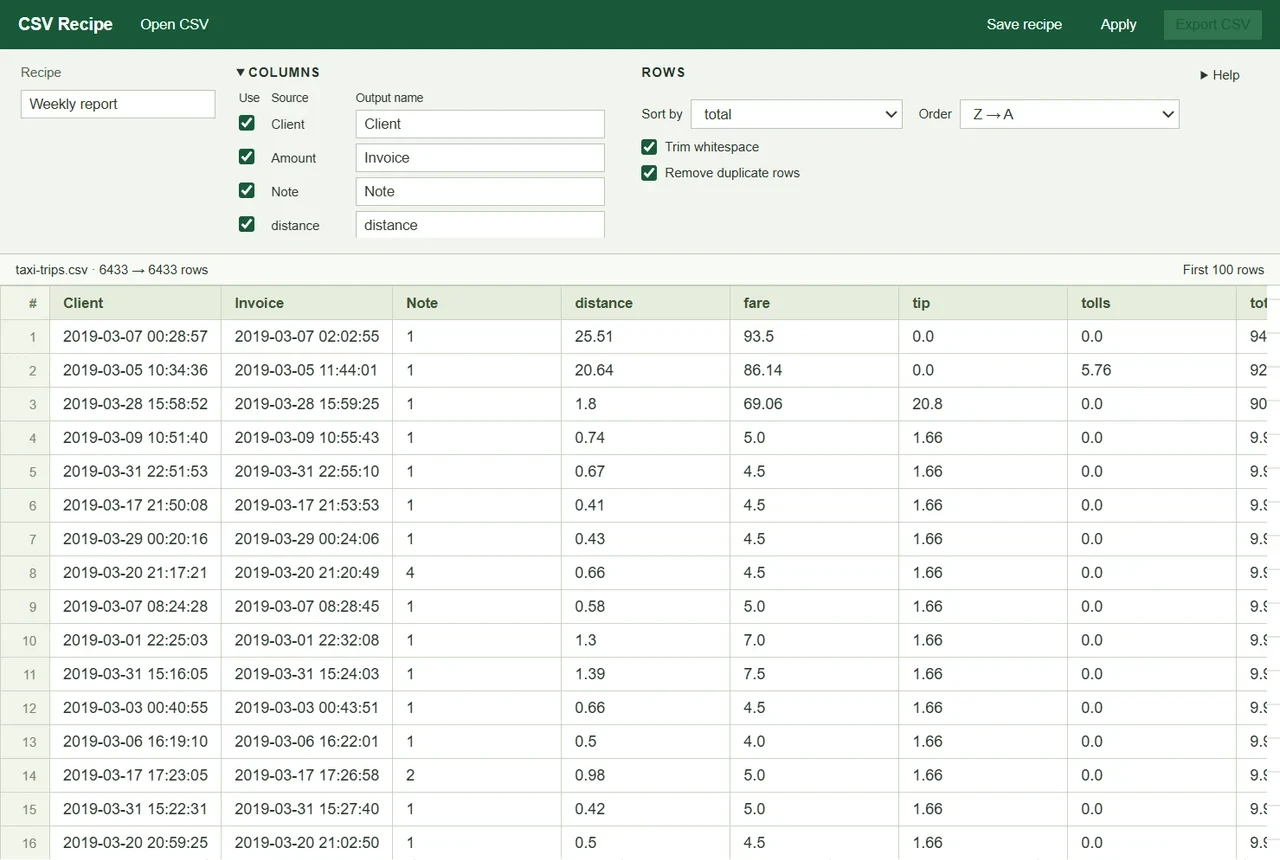
The example retained 6,433 rows after whitespace cleanup and duplicate removal. The table previews the first 100 output rows.
Check the two rules that can change your expectations
Sorting is alphabetical text order, even when a column contains numbers. For example, text sorting can put 100 before 20 in ascending order. The A → Z and Z → A choices do not turn a fare or total into a numeric value. Use a numeric-aware spreadsheet or another workflow when numerical ranking is the goal.
Duplicate removal uses the selected output columns. Two input rows that differ only in a discarded column can become the same output row. Check your column selection before using the reduced row count as evidence that the source contained duplicates.
Leading zeros remain text rather than being deliberately converted to numbers. CSV quoting is handled on export, and cells that begin like formulas receive protection. The program opening the resulting file can still have its own type-import behaviour, so choose text columns there when identifiers must remain unchanged.
Save once, then reuse carefully
Enter a useful recipe name and choose Save recipe. When another file with the expected headers arrives, open it, apply the saved choices and inspect the preview before exporting.
The current app keeps one recipe. It is not a library of independently saved pipelines. If a later file is missing a column required by the saved recipe, the app reports the mismatch and you need to reconfigure the choices. Do not assume a changed export schema will be silently repaired.
Verify the saved CSV
Choose Export CSV and select a destination. Open the saved file to confirm the headers, row count and ordering. In our taxi example, every exported row was compared independently with the expected text transformation; all 6,433 records were present. The 100-row preview is a display limit, not an export limit.
Inputs are bounded to 16 MiB, 100,000 rows and 100 columns. Inconsistent row widths are rejected rather than guessed. Processing happens locally in the micro-app, and exporting does not overwrite the source unless you deliberately select that path through the save dialog.
Open CSV Recipe in Aelrox with a representative export and save the rule only after the output matches your intended format. See micro-app permissions and safety for selected-file access and storage boundaries.