
Log Excerpt in Aelrox finds matching lines in a UTF-8 log and exports them with a chosen number of surrounding lines. It helps turn a larger file into a focused excerpt while keeping the nearby events needed to understand a message.
The result is plain text. The app does not upload it, automatically redact secrets or interpret the cause of an error. Review the saved excerpt before sharing it.
Select a file and a concrete search
Install Aelrox, find Log Excerpt in the desktop Micro Apps Store and open it. Choose Open log, select a UTF-8 file and enter a keyword in the prompt at the bottom.
Our example uses the public Loghub Apache sample, which contains 2,000 service-log lines. We searched for error, left Match case off and set Context to 2.
Choose Extract. Context 2 asks for up to two lines before and after each match. Nearby matching areas overlap, so the result should not repeat the same source line simply because it belongs to two areas.
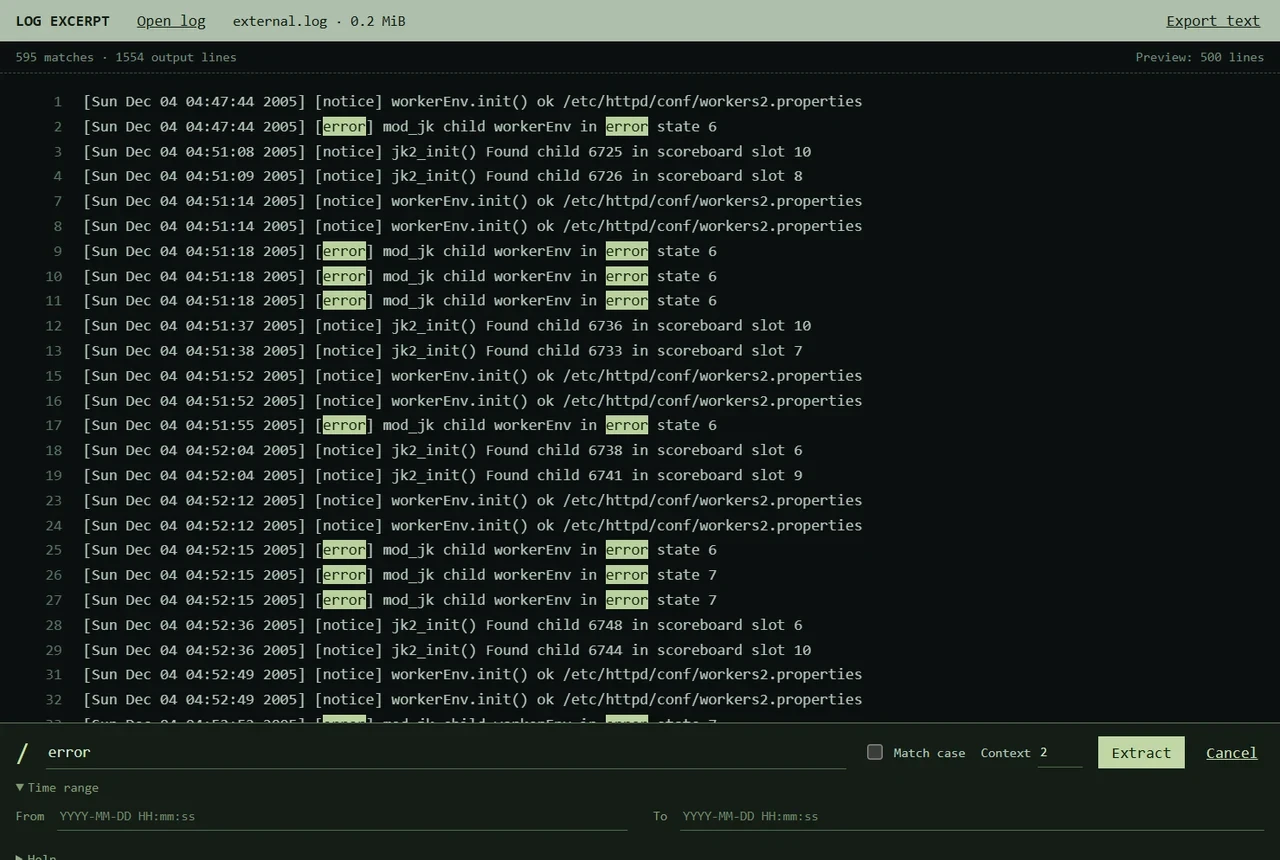
The public Apache sample produced 595 matches and 1,554 output lines with this query and context setting.
The example's complete exported text was checked against the expected source lines. These counts describe this file and these settings; another log will produce different results.
Use the preview to check the selection
The preview displays original line numbers, making gaps between selected areas visible. It shows at most 500 lines, even when the export contains more. In our example, the preview stopped at its display limit while the export retained all 1,554 selected lines.
Increase Context when the useful explanation appears before the error, or reduce it if the excerpt includes too much unrelated activity. The permitted range is 0–50 lines. Matching a word inside a stack trace does not automatically include the entire trace; choose enough context and inspect the result.
Apply time filters only to supported timestamps
The Time range fields are for timestamps at the beginning of a line in YYYY-MM-DD HH:mm:ss or YYYY-MM-DDTHH:mm:ss form, optionally preceded by a left bracket. The tool does not convert time zones.
The Apache example begins with dates such as [Sun Dec 04 ...], so we left the time fields empty. That format is outside the current time filter. Keep this distinction in mind before treating an empty filtered result as “no errors occurred.”
Context lines may extend beyond the selected time range. That is intentional: they provide the neighbouring events around an in-range match.
Save and inspect the excerpt
Choose Export text, select a destination and open the saved file. The export contains the selected log text without the preview's added line numbers. Check that it includes the event you needed, then remove any sensitive information before sharing it.
The app supports UTF-8 files up to 512 MiB, with exports bounded to 10,000 lines or 4 MiB. A generated file of about 80 MiB was exercised on Windows and Mac; that is not a multi-gigabyte performance claim. You can cancel extraction, and a file that changes during reading is rejected rather than treated as a stable result.
Open Log Excerpt in Aelrox and start with one distinctive error message. Read micro-app permissions and safety for the selected-file access model.